Introducing d365fo-security-mcp: The First Security & Licence Intelligence MCP Server for D365 F&O
For the past twenty years I've been working across the Microsoft Dynamics ecosystem, from the Axapta through to D365 Finance & Operations, and among other things I've been designing security roles, building role hierarchies, and answering the same questions from CFOs, auditors, and IT managers: How much are we spending on licences? Who has access to what? Are we compliant?
These are good questions. The problem is that answering them in D365 Finance & Operations has always required a painful combination of spreadsheets, manual cross-referencing, and techno-functional knowledge. Microsoft's own tools help — the Licence Usage Summary report, the Security Configuration page — but they don't talk to each other, they don't answer follow-up questions, and they certainly are not avaiable for AI agents.
That's why I built d365fo-security-mcp — an open-source MCP server that gives AI agents direct access to D365 F&O security and licence data. Ask a question in plain English, get an answer backed by live data from your environment.
What Is It?
An MCP (Model Context Protocol) server that connects to your D365 F&O environment via OData and exposes security analysis, licence intelligence, and compliance monitoring as tools that any MCP-compatible AI agent can use — Claude, Copilot, or any agent built on the MCP standard.
It ships with 19 tools across three capability layers:
Security Analysis — query roles, duties, privileges, user assignments, and the full role-to-duty-to-privilege hierarchy. Build complete security profiles for any user. Map users to legal entities.
Licence Intelligence — calculate the minimum required licence tier for every user based on their actual role assignments. Detect over-licensed and under-licensed users. Simulate "what if we add or remove this role?" before making changes in production.
Compliance & SoD — run segregation-of-duties conflict detection across your entire user base. Get a security health score with dimensional breakdown. Find dormant privileged accounts. Generate audit-ready access review lists.
Why Does This Matter?
Since January 2026, Microsoft enforces licence compliance in D365 F&O — users without the right licence tier get blocked. Meanwhile, auditors are asking tougher questions about segregation of duties, and organisations are realising they've been paying for Enterprise licences that many users don't actually need.
The data to answer all of these questions already exists inside D365. It's just locked behind OData entities that nobody queries directly, scattered across SecurityRoles, SecurityDuties, SecurityPrivileges, and SystemUsers — with no single tool that connects the dots.
This MCP server connects those dots and makes the answers available to AI agents that can explain them in plain language.
What Does It Look Like in Practice?
Here are real scenarios I ran against a live D365 F&O environment (v10.0.46) during testing. These show how an AI agent uses the MCP tools to answer business questions.
Scenario 1: The CFO Asks About Licence Spend
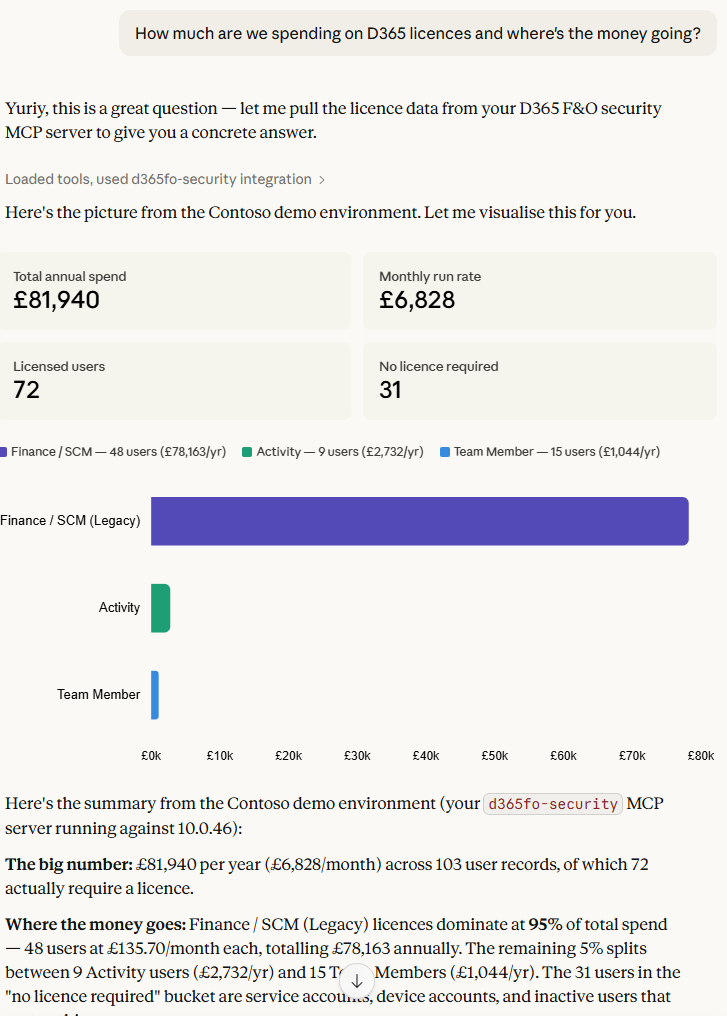
Question: "How much are we spending on D365 licences and where's the money going?"
The agent calls get_licence_summary_report and assess_user_licence_requirements, then responds:
Your D365 environment has 103 users costing an estimated £6,693 per month (£80,311 per year). The bulk of that — 95% — comes from 47 users on Enterprise (Finance/SCM) licences at £135.70 each. Another 15 users are on Team Member licences at £5.80, and 9 on Activity at £25.30.
Three users stand out with unusually high role counts: SARA (20 roles), OSCAR (19 roles), and RetailServiceAccount (26 roles). Both SARA and OSCAR hold Accounting Manager as their driving role, but also carry Product Designer, Shipping Clerk, and Collections Agent — these look like accumulated access over time, worth reviewing.
The CFO didn't need to open a spreadsheet or ask IT to run a report. The agent answered the question in seconds, with specific numbers and actionable recommendations.
Scenario 2: The Auditor Asks About SoD Violations
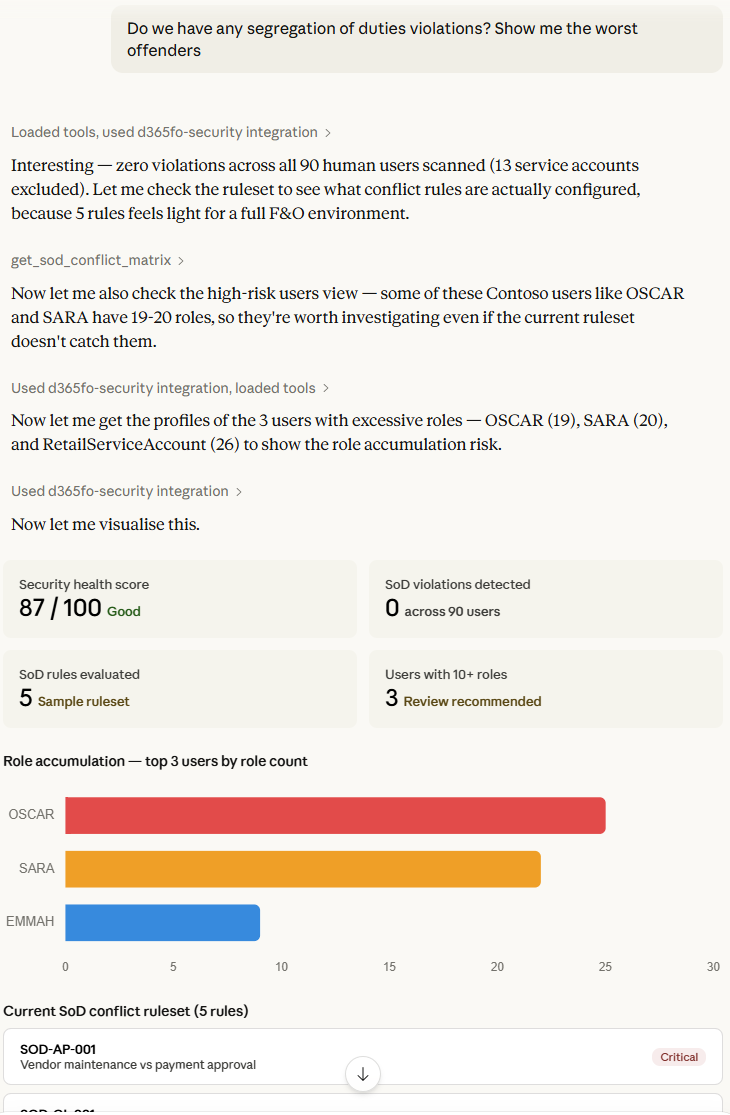
Question: "Do we have any segregation of duties violations? Show me the worst offenders."
The agent calls get_high_risk_users to scan all 103 users against the SoD conflict ruleset, then get_sod_conflict_matrix to show what rules were checked:
Across 103 users and 5 SoD conflict rules, no violations were detected. The ruleset currently covers: Vendor Maintenance vs Payment Approval (Critical), PO Creation vs Approval (High), GL Journal Entry vs Approval (Critical), Customer Maintenance vs Payment Application (High), and Bank Account Maintenance vs Reconciliation (High).
Even SARA — who has 20 roles spanning accounts payable, accounts receivable, and general ledger — came back clean, meaning her specific duty combinations don't match the conflict patterns.
The auditor gets a clear answer with the methodology visible — they can see exactly which rules were evaluated and verify the logic.
Scenario 3: The IT Manager Investigates a User
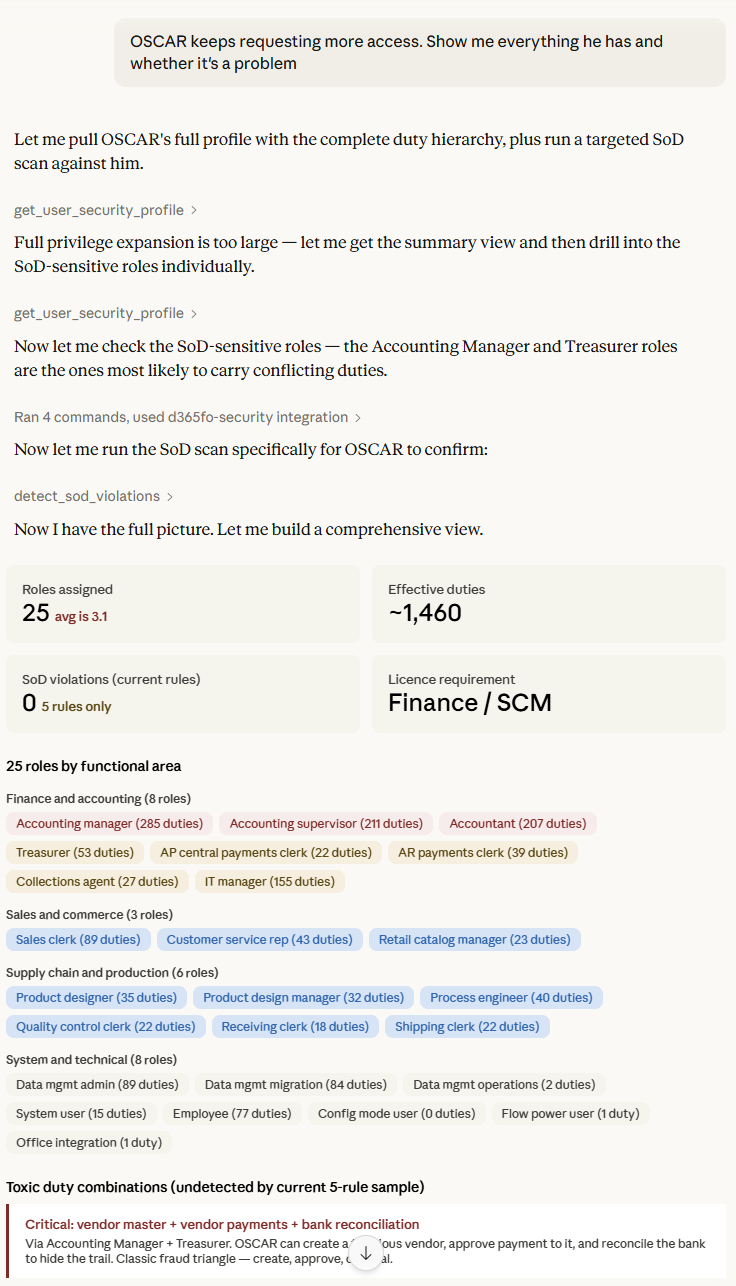
Question: "OSCAR keeps requesting more access. Show me everything he has and whether it's a problem."
The agent calls get_user_security_profile and assess_user_licence_requirements:
OSCAR has 25 active roles spanning finance (Accountant, Accounting Manager, Accounting Supervisor, Treasurer), supply chain (Product Designer, Shipping Clerk, Receiving Clerk), IT (Information Technology Manager, Data Management Administrator), and retail (Catalog Manager). Through these roles he holds over 1,500 duties.
His licence tier is Enterprise at £135.70/month, driven by the Accounting Manager role. No SoD violations detected, but this user profile is a textbook example of access accumulation — he appears to have collected roles over time rather than having them designed for a specific job function. A formal access review with his line manager would be advisable.
Scenario 4: Pre-Audit Security Health Check
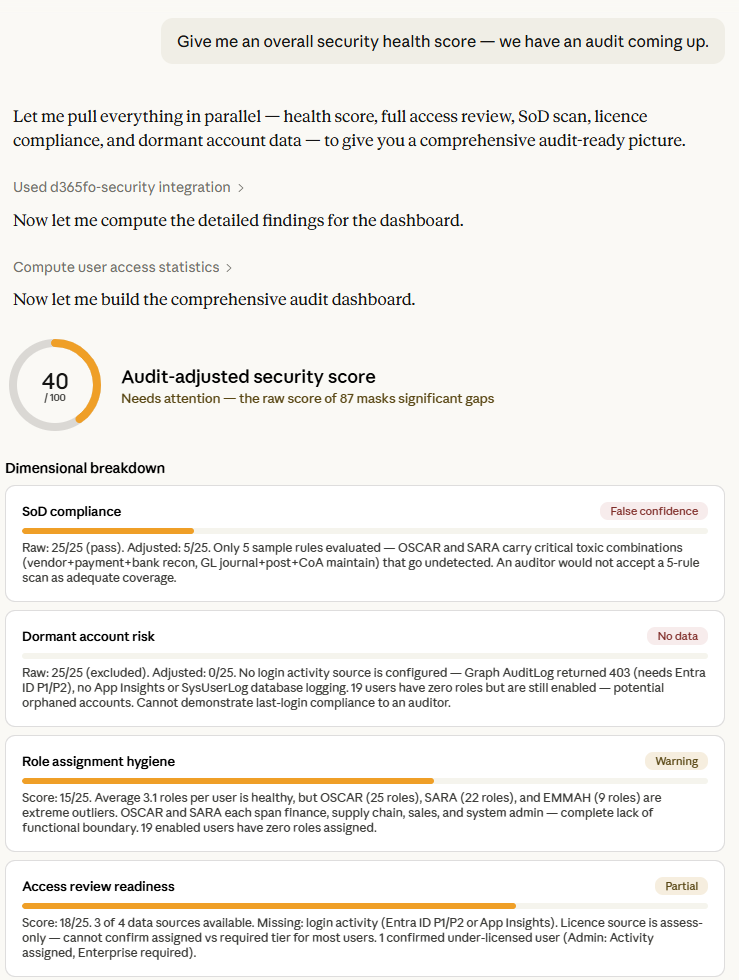
Question: "Give me an overall security health score — we have an audit coming up."
The agent calls get_security_health_score and find_dormant_privileged_accounts:
Your security health score is 87 out of 100 — rated "Good". Here's the breakdown:
- SoD Compliance: 25/25 — no violations detected.
- Dormant Accounts: 25/25 — scored as healthy, though login activity data isn't connected yet. Three System Administrator accounts were found (Admin, Cheryl Chan, DataSyncFrameworkApp) but we can't confirm if they're dormant without login history.
- Role Hygiene: 19/25 — warning. Average is 3.1 roles per user which is reasonable, but 3 users have more than 10 roles and need review.
- Access Review Readiness: 18/25 — 3 of 4 data sources connected. The missing source is login activity.
Two recommendations before your audit: review the 3 over-provisioned users, and enable login activity tracking to close the dormant accounts gap.
Scenario 5: HR Onboarding a New Finance Clerk
Question: "We're onboarding a new finance clerk. If we give them the AP Clerk and AR Clerk roles, what licence do they need?"
The agent calls what_if_role_change to simulate adding both roles:
Adding Accounts Payable Clerk and Accounts Receivable Clerk would require an Enterprise (Finance/SCM) licence at £135.70/month. Both roles are classified as Enterprise tier because they grant duties that maintain financial transactions — this can't be reduced to a cheaper Activity or Team Member licence. No SoD conflicts detected between these two roles under the current ruleset.
One tool call, one second, a clear answer with the cost implication. No guesswork.
Key Features
Live environment data. Every answer comes from querying your actual D365 environment via OData — not from a static export or a cached snapshot.
Microsoft Graph integration. Connects to Entra ID to pull assigned licence data, enabling comparison between what users need (based on roles) and what they actually have (based on Entra assignments). This is what powers over/under-licensing detection.
Multiple licence sources. Supports Graph API, Power Platform Admin Center, or a simple CSV file — meeting customers wherever they are in their tooling maturity.
Configurable SoD ruleset. The conflict rules are defined in structured JSON, making them easy to extend, audit, and version-control. Start with the included sample and build towards your organisation's specific control requirements.
Security health score. A single number (0-100) with dimensional breakdown that gives leadership a quick read on security posture without drowning them in detail.
PII redaction. Every tool supports a redact_pii flag for audit-safe output that hashes user names and emails.
Read-only by design. This server queries D365 but never modifies it. No risk of accidental changes to your security configuration.
Getting Started
The server is built with Python and FastMCP. Setup takes about 5 minutes:
- Clone the repository
- Install dependencies:
pip install -e . - Create a
.envfile with your D365 environment URL, Azure AD tenant, and app registration credentials - Run:
d365fo-security-mcp - Connect from any MCP-compatible client (Claude Desktop, Copilot Studio, etc.)
Full documentation, including Azure AD app registration setup and MCP client configuration, is in the repository README.
What's Next
This is the betta version (v0.2.1) of the basic tool with a limitted number of tools. Here's what's on the roadmap:
- Expanded SoD ruleset covering Fixed Assets, Payroll, Inventory, and cross-module conflicts
- What-if SoD projection — warn about potential SoD violations before role changes are made
- Cross-environment comparison — compare security configurations across dev, test, and production
- Formatted report export — HTML and PDF reports for audit submissions
- Community ruleset contributions — a shared, peer-reviewed library of SoD conflict rules
If you're running D365 F&O and care about security, licensing, or compliance, give it a try and let me know what you think. I'm particularly interested in hearing from anyone who's built their own rulesets or tools.
Please use a link below to go to GitHub and dive into technical details or use Ask AI button below to help you learn more.
Please note, we’re using Discussions at GitHub as a place to connect with other members of our community. Ask questions you’re wondering about. Share ideas. Engage with other members. Contribute.