Effective Labor Rate (ELR) in Microsoft Dynamics AX 2012 R2
The Effective Labor Rate (ELR) is the dollar value income per hour of an employee after calculating productivity. Alternatively, the ELR defines the hourly cost of a worker if they work all the available hours in a work week. AX 2012 R2 introduced the ability to designate project cost as an Effective Labor Rate.
Setting Up ELR
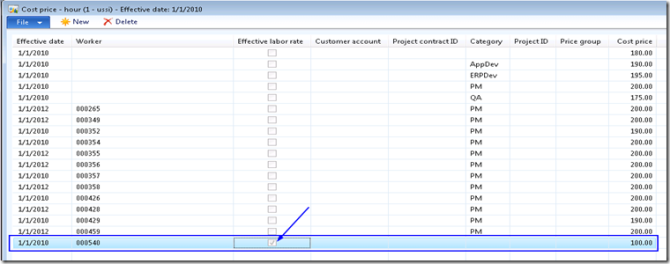
- Go to Project Management and Accounting > Setup > Prices > Cost prices (Hour).
- Set up the cost price for the employee and check the Effective labor rate checkbox.
- Go to HRM > Workers, select the worker, then click Project Management > Project Setup and mark Use ELR.
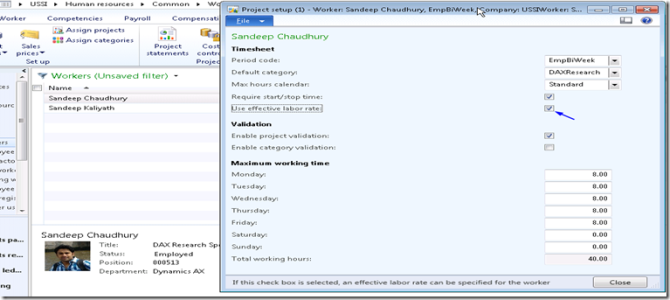
In this example, the cost of the worker is set to $100 and marked as ELR. The worker is set up to work 8 hours each day (Monday to Friday) in the resource calendar.
How ELR Calculation Works
When recording a project hour journal, the system does not populate the cost price field automatically at entry time.
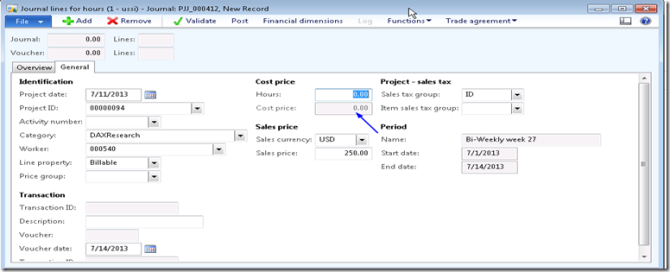
If the employee worked 24 hours in a given week and you post the hour journal, the system automatically calculates the cost price based on full productivity hours (40 hours) for the week.
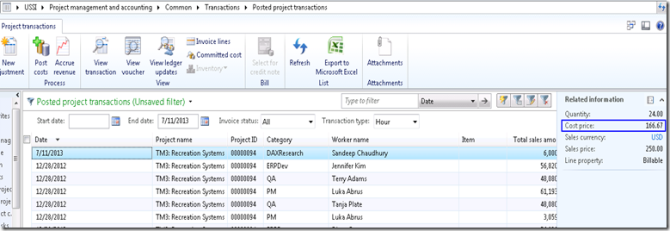
The formula for ELR calculation is:
ELR = Effective labor rate price per hour ($100) × Number of hours per week per the worker's work calendar (40) ÷ Number of hours worked/registered in the week (24)
In this example, the calculated cost price would be $166.67 per hour ($100 × 40 ÷ 24).
Source: Effective Labor Rate in Microsoft Dynamics AX 2012 – Sandeep Chaudhury